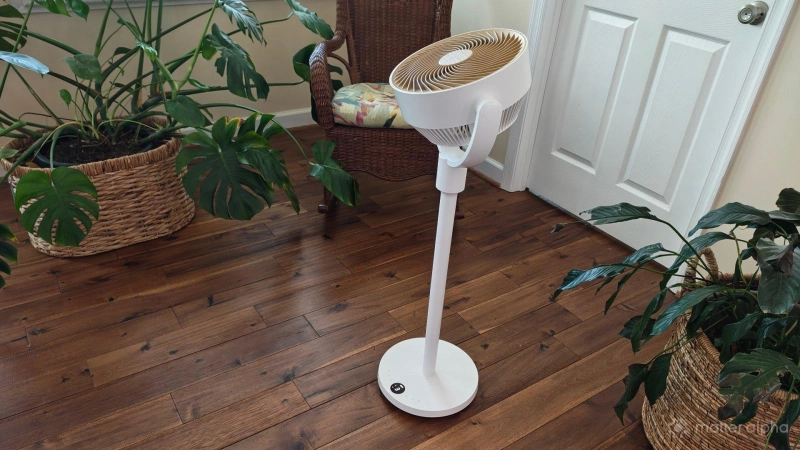
I bring many smart home products into my home, but it's not often that one is universally liked by everyone who sees it. The SwitchBot Standing Circulator Fan has been that product. It is gorgeous, practical, and feature-rich. Its advantages over regular fans are immediately obvious.
SwitchBot has done the work to integrate this fan with each of the major smart home platforms, but the Matter support is quite sparse. While you absolutely should not buy this fan for its meager Matter integration, I strongly feel it's worth buying nonetheless.
A design that nails both form and function
The Standing Circulator Fan is a slightly more expensive, floor-based version of SwitchBot’s existing battery-powered Circulator Fan. When you unbox the Standing Circulator Fan, it comes in four basic parts: the base, two poles that you screw on, and the rotating fan head on top. It makes logical sense which parts screw into which, and I felt no need to look at a guide to put it all together. 
The base of the fan contains touch controls. Here you can toggle all of the fan's controls in case you don't have the app set up or have misplaced the remote. There's also a screen that displays the fan speed on a scale of 1 to 8, along with a battery indicator. There's a power switch on the back of the base, directly next to where you plug in the power cord. 
The fan head is entirely made of plastic, though it resembles wood from a distance, quite akin to what you can see in our review of the SwitchBot’s Air Purifier Table. It's a pleasing, calming aesthetic that makes the fan not just functional, but an attractive piece of decor. The head can rotate horizontally and vertically, with enough flexibility to point straight up in the air. It can rotate 90 degrees in both directions.
Excellent smart home functionality—if you have a SwitchBot hub
Like many Switchbot products, the Standing Circulator Fan is not Matter native. It does not come with a QR code, and you cannot add it to your smart home platform of choice right away. It communicates using Bluetooth LE and requires a SwitchBot Hub for smart home functionality. I've connected the fan to a SwitchBot Hub Mini and a SwitchBot Hub 3. It works equally well with either.
To get started, you must first download the Switchbot app, which remains one of my favorite smart home apps. Setup is painless. Once connected, you can adjust the speed of your fan and select whether it rotates horizontally, vertically, or both. You can set timers to turn the fan off after a set number of hours. There are also some presets available, such as for using the fan around the baby or while you're asleep. 
I was surprised to see that there is a built-in light inside the fan head, which you can set to be either dim or bright. I find it projects just enough light to see around our bedroom room but not so bright that I feel compelled to turn it off before I fall asleep. Having it on while the fan circulates is a pleasing bit of bedroom ambiance.
Unfortunately, Matter barely matters
You integrate the SwitchBot Circulator fan the same way you do most SwitchBot products. You select the SwitchBot hub and then select which devices you want it to expose to your smart home platforms.
The nice thing about this setup is that you do not have to scan a QR code for each individual device. You only need to connect the SwitchBot hub via Matter and then every device you tell that hub to share automatically appears.
The SwitchBot Hub 3 can manage up to 30 devices, making this a quick way to add a home full of fans, weather sensors, and automated window blinds to your Matter home at once.
Unfortunately, the SwitchBot Standing Circulator Fan does not expose most controls over Matter. When I connected the fan to my Homey Pro, the only option available was a choice to turn the fan on or off.

This isn't useless functionality, to be sure. If you tend to keep the fan set to the same speed, then this integration is enough to be able to pair the fan with any of the best Matter presence sensors, which will enable it to turn on automatically when you enter a room and turn off when you leave. But if you wish to adjust the speed of your fan remotely or via automation, then the Matter integration just isn't going to cut it.
This is a shame, and it means that for the time being, I don’t use Matter to control my fan. Fortunately, this does not mean I need to open up the SwitchBot app. Since I have built my smart home around a Homey Pro, I can simply install the SwitchBot Homey app to gain access to the remaining controls. While I must still sign into my SwitchBot account, the actual communications still take place locally, with my Homey devices and SwitchBot hubs communicating to one another via Bluetooth. Similar integrations exist for Home Assistant along with the big for corporate options: Apple Home, Google Home, Amazon Alexa, and Samsung SmartThings.
Would I prefer all of this to be performed over Matter? Yes. That provides a degree of peace of mind that the functionality won't go away because a company loses interest. Yet in the here and now, it makes little difference.
The best thing about this fan isn't its smart features

We are a smart home website and specifically a Matter one. We love for a product to have great smart home features and excellent Matter integration in order for us to give it its flowers. In this case though, I recommend this product even if you never connect it to your smart home at all. It is simply an attractive and quiet fan, and my favorite aspect is the fact that it's battery-powered.
A battery-powered fan isn't groundbreaking technology, but it isn't yet commonplace. The ability to unplug the fan enables you to place it anywhere in the room where it might be needed. You can also take it outside while sitting on the porch on a hot day. You can place it in the middle of an open concept living room and have it circulate the air while guests are over. With the fan set on low, it can circulate air for up to half a day. I left it on at night and was happy to see it still circulating air come morning.
As someone who lives in a rural area along America's somewhat hurricane-prone east coast, this fan is an easy addition to our emergency survival kit. It can keep us cool during an outage for hours at a time, and it's easy to recharge from a portable power station. This has incentivized me to get more than one.
Should you buy the SwitchBot Standing Circulator Fan?

There's no mystery with this one. My answer is yes. At $120, it's not the cheapest fan. Like many SwitchBot products, it's also almost always on sale. It's easy to find for just under $100 if you get your timing right, and it's available from Amazon.
For a fan that is this quiet, portable, and connected, I think it's absolutely worth the investment—especially when you consider that many of its features are available without ever connecting the fan to an app.
While the barebones Matter integration is a disappointment, the Switchbot Standing Circulator Fan makes a great addition to your home whether yours is a smart one or not.